Table of Contents (click to expand)
A computer mouse tracks your hand movement and moves the on-screen cursor to match. In a mechanical (ball) mouse, a rolling rubber ball turns two wheels that measure side-to-side (x-axis) and up-and-down (y-axis) motion. A modern optical mouse shines an LED on the surface while a tiny camera snaps thousands of images per second; a processor compares them to work out how far and which way you moved.
I vividly remember one time when my computer mouse became inoperative. With no alternative at my disposal, I had to depend entirely on the keyboard to get my work done. Not only did it take almost twice as long, but working without a mouse also turned out to be incredibly frustrating! That’s when I first realized the true importance of that tiny thing lying unassumingly beside every 21st-century human’s desktop.
Whenever we want to get anything done on a desktop computer screen, our hands instinctively reach out for the mouse; when you move the mouse on the desk, the pointer on the screen moves in the same pattern with absolute precision. How does this action, which so many of us take for granted, actually happen?
What’s A Computer Mouse?
The joking comparison of a computer mouse and a real mouse is antiquated, so let’s skip that. A computer mouse, as we all know, is an electronic device (which may or may not be wireless) that helps to move the cursor on a computer screen as you move the mouse over a flat surface. So, a mouse essentially calculates how much you move it in a certain direction (in two dimensions) and subsequently feeds the computer that information to allow for comprehensive control of the graphic user interface.
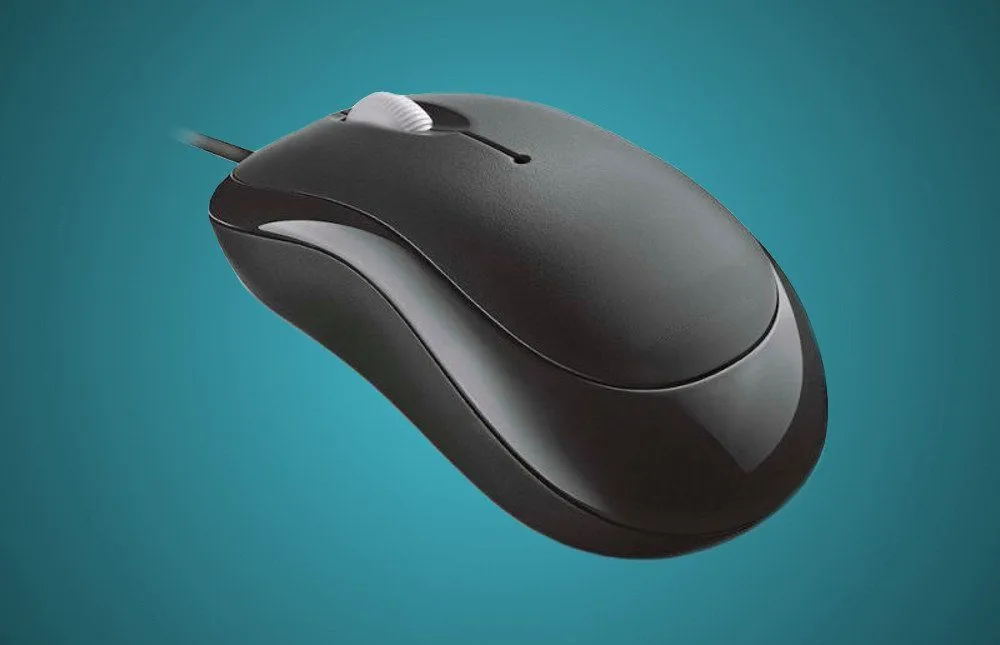
There are a number of variants of computer mice, including a mechanical mouse, optical and laser mice, a 3D mouse, inertial and gyroscopic mice, the ergonomic mouse, gaming mice and tactile mice, but in this article, we’re going to discuss the two most popular variants among these. So, let’s get started!
What Is A Mechanical Mouse?
A mechanical mouse consists of a heavy rubber ball whose movement makes the cursor move on the screen. Commonly known as the ‘rolling rubber ball’ mouse, it is considerably heavy, thanks to the rubber ball, a few wheels, and a number of other mechanical parts present inside it.
How Does A Mechanical Mouse Work?
When you move the mouse, the ball rolls beneath it, pushing the two plastic wheels/rollers linked to it in the process. One of those wheels detects side-to-side movement (x-axis wheel) and the other (y-axis wheel) detects movement in the up-and-down direction. Both of these wheels consist of spokes that ‘break’ a thin light beam inside the mouse. The number of times the beam breaks helps to calculate how far the mouse has moved.
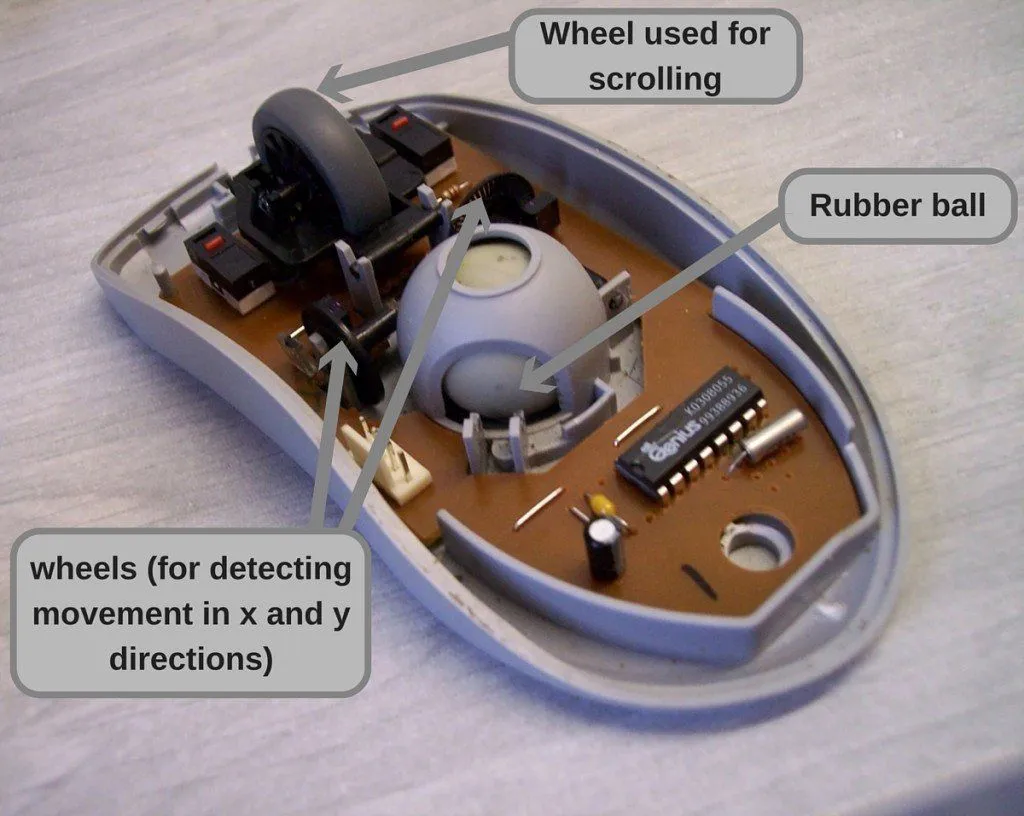
For instance, when you move the mouse straight up, the y-axis wheel turns. The farther up you go, the more the ball pushes the wheel and the more it breaks the light beam. This helps to determine how far the mouse has moved straight up. Similarly, the mouse uses the x-axis wheel to calculate side-to-side movement. When the mouse is moved at an angle, the calculations obtained from the movement of both of these wheels are used.
Mechanical mice were the standard for decades, but due to their clunkier design and the fact that the ball constantly picked up dust and grime (which meant frequent cleaning), they were steadily replaced by optical mice. The turning point came in 1999, when Microsoft's IntelliMouse Explorer brought ball-free optical tracking to the mainstream, and by the mid-2000s the rolling-ball mouse had all but disappeared from store shelves.
What Is An Optical Mouse?
An optical mouse is technologically much more advanced than a mechanical mouse. Unlike the latter, an optical mouse has no moving parts for tracking. It consists of an LED (which generates the signature red glow you can see under the mouse), a tiny image sensor (essentially a low-resolution camera), a digital signal processor (DSP) that does the number-crunching, a switch mechanism for the buttons, and a few other simple components. Some mice have another LED that lights up a plastic strip on the body as an indication that the mouse is powered on.
How Does An Optical Mouse Work?
The LED installed at the bottom of the mouse emits a bright light in the downward direction. Since a mouse is usually used on plain surfaces, the light bounces back from the surface and enters a small image sensor that’s also mounted on the bottom, almost next to the LED.
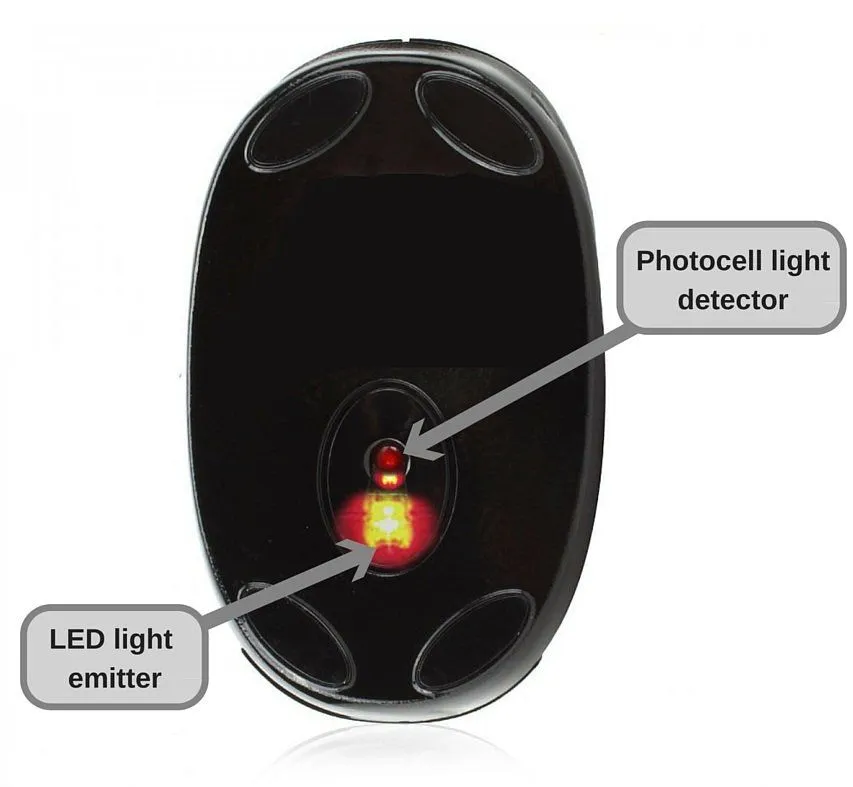
Behind a small lens, this sensor works like a miniature digital camera, snapping thousands of low-resolution photos of the surface every second. As you move the mouse around, the on-board digital signal processor (DSP) compares each new image with the one just before it. By measuring how the tiny surface features (scratches, fibers, specks of dust) shift from frame to frame, the DSP works out how far and in which direction you’re moving the mouse, then passes those coordinates to the computer.
Optical mice are much lighter and faster than mechanical ones, and have therefore gained enormous popularity all over the world. A close cousin, the laser mouse, swaps the LED for a laser diode; the focused laser light reaches deeper into a surface’s texture, so a laser mouse can track on tricky surfaces like glass or glossy desks where a standard optical mouse struggles. The underlying camera-and-DSP principle, however, is exactly the same.
How Do The Buttons And Scroll Wheel Work?
Tracking is only half of what a mouse does; the other half happens every time you press a button. Underneath each button sits a tiny component called a microswitch (formally a miniature snap-action switch). When your finger pushes the button, a small actuator flexes a spring-loaded lever until it passes an “over-center” point, at which the metal contacts snap together all at once and complete an electrical circuit. That sudden snap is exactly what produces the crisp, audible click and the tactile feedback you feel. The mouse instantly reports which button fired, so the leftmost (primary) button selects things while the rightmost (secondary) button opens a context menu.

The scroll wheel is built around a small rotary encoder. As the wheel turns, the encoder reports both the direction and the amount of rotation, which the computer translates into scrolling. Most wheels are fitted with detents, spring-loaded notches that make the wheel turn in discrete steps rather than spinning freely, so you can feel roughly how far you have scrolled. On the majority of mice you can also press straight down on the wheel to trigger a third, middle-mouse button. So while people often ask how many wheels a mouse has, the answer is that the single wheel you can see does the scrolling, whereas the old ball mouse hid two more encoder wheels deep inside.
What Surface Does A Computer Mouse Need?
An optical mouse is essentially a tiny high-speed camera, and a camera needs something to look at. To work out how you are moving, its sensor compares thousands of snapshots of the surface every second and tracks how the microscopic features (scratches, fibers, specks of dust) shift from frame to frame. That is why a modern LED optical mouse runs happily on most opaque, diffuse surfaces such as wood, paper, or a cloth mouse pad: they are covered in tiny irregularities for the sensor to lock onto.

Trouble starts on a smooth, shiny surface. On specular materials like glass or polished stone, the light either passes straight through or bounces away at an angle instead of scattering back, and the surface offers almost no texture, so the sensor sees a featureless void. The result is a cursor that jitters, skips, or freezes. This is precisely the problem a mouse pad solves: it guarantees a consistent, textured, opaque surface underneath the sensor. A laser mouse copes better because its focused laser light reaches deeper into a surface’s texture, improving tracking on the specular surfaces where a standard optical mouse struggles. So the honest answer to the classic fill-in-the-blank, that a mouse is kept on a ___, is any opaque surface with a bit of texture, and a mouse pad is simply the most reliable one.
How Does A Wireless Mouse Work?
Cutting the cord does not change how a mouse tracks your hand; the optical sensor and processor still do exactly what we described above. All that changes is how those coordinates reach the computer. Instead of traveling down a cable, they are sent over a short-range radio link, and a small battery inside the mouse powers the whole thing. This is also why a battery-powered optical mouse flashes its LED on and off rather than glowing steadily: pulsing the light and only tracking continuously once it senses motion saves a surprising amount of power.

In practice, there are two common ways to make that radio link. The first is a proprietary 2.4 GHz connection paired with a small USB receiver, the little dongle you plug into a spare USB port. The receiver and the mouse talk to each other directly on the 2.4 GHz band without leaning on the computer’s operating system, and a single receiver can often serve several devices at once (Logitech’s Unifying receiver, for instance, links up to six mice and keyboards). The second option is Bluetooth, which skips the dongle entirely and uses the radio already built into most laptops and tablets. The trade-off runs roughly like this: a dedicated 2.4 GHz dongle tends to deliver faster, steadier response with lower lag (which is why serious gaming mice still prefer it), while Bluetooth keeps your USB ports free and usually sips less power.
What Are The Different Types Of Computer Mice?
The ball mouse and the optical mouse are only the two most familiar members of a much larger family. Once you know how tracking works, the other designs are easy to recognize as variations on the same idea.

A trackball is essentially a mouse flipped upside down: the ball sits on top (or on the side) and you roll it with your thumb or fingers while the body stays put, which makes it handy when desk space is tight. It is older than you might think, since a version was built back in the 1940s for a military radar system, predating the desktop mouse by more than a decade. A vertical (ergonomic) mouse tilts the whole device onto its side so your hand rests in a natural handshake position, which reduces the twisting of the forearm and is designed to help avoid repetitive strain injuries such as carpal tunnel syndrome. Gaming mice push the sensor hard, offering very high sensitivity measured in dots per inch (DPI), a figure that can climb to roughly 25,600, along with extra programmable buttons for shortcuts and macros. Finally, 3D mice trade the flat desktop for at least three degrees of freedom, letting designers push, pull and rotate objects inside CAD and 3D-modeling software. Different jobs, but the same underlying trick of turning physical motion into on-screen movement.
With improvements in technology, newer and even more advanced mice – that address issues like ergonomics and the health of the user – are taking center stage. The choice of the right variant rests with the user, but one thing remains universally true – computers and mice shall always remain inseparable.
References (click to expand)
- PC mouse info - Washington. The University of Washington
- Lyon, R. F. (1981). The Optical Mouse, and an Architectural Methodology for Smart Digital Sensors. VLSI Systems and Computations. Springer Berlin Heidelberg.
- Dernoncourt, F. (2014). Replacing the computer mouse (Version 1). arXiv.
- Computer mouse - Wikipedia
- Scroll wheel - Wikipedia
- Miniature snap-action switch - Wikipedia
- Trackball - Wikipedia
- Logitech Unifying receiver - Wikipedia
- USB-RF vs. Bluetooth for Mice and Keyboards: Which Is Better? - How-To Geek