Table of Contents (click to expand)
- Why Does RAM Forget Everything When The Power Dies?
- Why Does Your Computer Wait To Save Files To The Disk?
- What Does A Proper Shutdown Actually Do?
- What Happens When You Hold The Power Button For 4 Seconds?
- Can A Force Shutdown Corrupt Files Or Damage Your Laptop?
- So, Is It OK To Turn Off A PC By Holding The Power Button?
A quick tap of the power button asks the operating system to shut down, which gives it time to write out files it is still holding in memory and to warn the drive that power is about to go. Holding the button for about four seconds trips a hardware timer that cuts power without asking the operating system, so anything still waiting in memory does not reach the disk. On a modern computer the drive and its folder structure almost always survive, but unsaved work, recently “saved” data still sitting in the write cache, and any file being written at that instant can be lost or left half-written.
The video call is still running, in theory. The cursor has turned into a spinning wheel, and nothing you click does anything. You hold the power button down, count to four, and the screen goes black.
The next morning the laptop starts as if nothing happened. The document you were editing is there, minus the last paragraph. So why does every IT person on Earth tell you not to do this?
Because “off” is not one thing. A tap and a long hold on the same button take two different routes to a dark screen. Only one of them lets the computer finish what it was doing.
Why Does RAM Forget Everything When The Power Dies?
Every computer keeps information in two places. The disk (a hard drive or SSD) is where your files live. RAM is the fast working memory the computer uses while it is doing things. Every letter you type lands in RAM first. The disk only sees your changes when something sends them back down.
The two kinds of memory hold a bit in different ways. Flash memory in an SSD traps a charge inside an insulated cell, and the charge stays put with the power off. RAM stores each bit as a tiny charge that leaks away in moments, so the chips have to top up their own contents constantly. That is why Windows describes a sleeping PC as one where memory is kept refreshed to hold your session. We have a longer explainer on why RAM is wiped the moment power is cut.
Cut the power and RAM is blank within a fraction of a second. The charge drains away, and the pattern that was your unsaved paragraph stops existing. Your document is safe only to the extent that it had already made the trip down to the disk.

Why Does Your Computer Wait To Save Files To The Disk?
You would think pressing Save sends your file straight to the disk. It usually does not. The operating system parks the saved data in a region of RAM called the write cache. It tells the app “done”, then writes the data to the disk a little later.
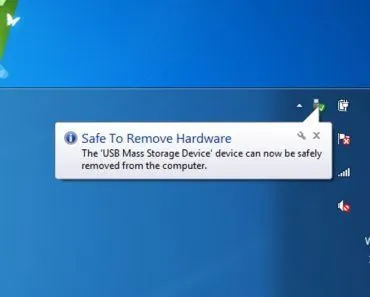
This is a speed trick, not laziness. Writing to a disk is slow next to writing to RAM, so the operating system bundles small writes into bigger ones. Microsoft's own documentation says disk write caching may improve performance. The same page says it may also lose information if power fails. Yanking a USB stick can lose files for the same reason. We covered that in what “Safely Remove Hardware” actually does.
How long does data wait in the cache? On Linux's standard file system the default is 5 seconds. The kernel manual warns that a power cut can cost you up to the latest five seconds of changes. Windows and macOS use their own timings. For a few seconds your file is “saved” on screen and not yet saved on the disk.

What Does A Proper Shutdown Actually Do?
Click Shut Down and the operating system runs through a checklist. It tells every open program to quit, which is when you get the “do you want to save?” prompt. It writes out everything in the write cache. Then it does something most people never see: it tells the drive that the power is about to go.
The drive has a small memory buffer of its own, and it can report a write as done before the data has landed in the flash. Micron, a maker of flash chips, describes the handshake. The computer sends the drive a standby command and waits for a reply. Before answering, the SSD finishes any unfinished writes. It also saves its updated map of where every piece of data lives. Only then does the power go off.
On Windows the default “Shut Down” is a form of hibernation called fast startup. It copies the core of the operating system to disk for a quicker boot, and it is still an orderly process. By the time the lights go out, nothing important exists only in RAM.
A proper shutdown takes a few seconds to a minute because it is doing all of this. A long hold on the power button takes four seconds because it is doing none of it.

What Happens When You Hold The Power Button For 4 Seconds?
The power button on a modern PC is not a switch in the electrical sense. It is an input, like a key on the keyboard. A quick press sends a signal that the operating system treats as a polite request to shut down, and the checklist above begins.
Holding it is different, and the difference is built into the hardware. The chip that manages power on the motherboard runs a timer. Intel's datasheet spells out the rule. Hold the button for at least four consecutive seconds and the hardware must switch off. It does not matter what the system was doing. The operating system is never asked, so it cannot empty its cache or warn the drive. This is the power button override, part of the ACPI standard that every PC follows. The four seconds is a default the firmware maker can change. Intel's notes admit the rule causes an occasional comedy. A user holds the button waiting for a sleeping machine to wake, and at four seconds it does the exact opposite.
The override exists on purpose. A frozen operating system cannot run a shutdown checklist, so there has to be an off switch that does not depend on it. Macs have the same escape hatch. Apple's advice for a Mac that will not shut down is to hold the power button until it does. Apple warns you may lose unsaved changes.
A long hold, then, is pulling the plug, delivered through a button. Every safeguard in the previous section is skipped. The thing that would run them is the thing being switched off.

Can A Force Shutdown Corrupt Files Or Damage Your Laptop?
Start with the good news, because there is more of it than the folklore suggests. The reason your laptop boots fine the next morning is a feature called journaling. Before the file system changes its own structure, it writes the plan into a log called the journal. If power dies halfway through, the next boot reads the journal. It either finishes the half-done step or throws it away. Either way the filing system comes back consistent. Windows' NTFS keeps a transaction-based log for this, and Linux's ext4 does the same.
Now the bad news, which is narrower but real. By default, journaling protects the structure of the filing system. It does not protect the contents of your files. The folder will be intact and the file will be listed in it. But a file that was being written at the moment of the cut can come back truncated, or half old version and half new. Anything still in the write cache is gone. Anything you had not saved never left RAM in the first place.
The drive adds a layer of its own. Server-grade SSDs carry capacitors. The stored energy lets the drive finish pending writes after the power drops. Consumer drives mostly protect the data already written, not the data “in flight”. A lab study cut the power to fifteen SSDs thousands of times. Thirteen of them misbehaved in some way, from corrupted bits to one drive that never came back. Those drives date from 2010 to 2012, but the lesson stands. “Non-volatile” describes the flash cells, not the drive's last second of work.
As for the hardware, a power cut is not a surge. The voltage goes away, with no jolt to burn anything. The damage is a data problem, with that one dead drive in the lab as the rare exception. If you want to fry a laptop you need heat or a lightning strike. SSDs do wear out, but from years of writing, as we explain in why SSDs wear out and RAM does not.

So, Is It OK To Turn Off A PC By Holding The Power Button?
As a last resort, yes. The override exists for this. A frozen machine cannot shut itself down, and holding the button beats yanking the cord. Journaling means the drive will come back, and in most cases so will everything on it.
As a habit, no. Every long hold is a bet that nothing important is sitting in either waiting room at that moment. Most of the time the bet pays off, because the cache empties every few seconds. Now and then it does not. The casualty is the spreadsheet you “saved” two seconds earlier, or a game save that was mid-write. The nasty case is a system update that was swapping the operating system's own files when the lights went out.
Before you reach for the button on a frozen machine, wait a minute. Many “frozen” computers are only busy, and the task manager can often close the stuck app.
Sleep keeps RAM powered and refreshed, so your session survives the night. A dead battery during sleep is the same as a power cut. That is why desktops often pair sleep with a hibernation file as insurance. And the long hold in troubleshooting guides, on a machine that will not start at all, is a different ritual. Dell's instructions are to unplug it, remove the battery if you can, and hold the power button for 15 to 20 seconds. That drains stray charge from the capacitors on the motherboard. Dell says it does not touch your personal files, and nothing was in RAM to lose.
The power button, then, is a good off switch and a terrible save button. Treat the long hold like the emergency brake in a car: there for the day you need it, and a bad sign if you use it every evening.

References (click to expand)
- System power states — Microsoft Learn
- How to manually turn disk write caching on or off — Microsoft Learn (KB 324805)
- ext4 General Information — The Linux Kernel documentation
- NTFS overview — Microsoft Learn
- How Micron SSDs Handle Unexpected Power Loss — Micron white paper (PDF)
- Event Input Signals and Their Usage, PWRBTN# (Power Button) — Intel Core Processor (Series 3) Datasheet, Volume 1
- Understanding the Robustness of SSDs under Power Fault — Zheng, Tucek, Qin, Lillibridge, USENIX FAST '13
- Shut down your Mac — Apple Support, macOS User Guide
- How to Perform a Hard Reset on a Computer — Dell Knowledge Base